SERVER F4 E14 / G04 / G04S / G14
Connection Instructions
1️⃣ Download Usb Redirector 1.9.7 Click Here
2️⃣ Connect the device in Fastboot mode to process
❇️Power off your Motorola completely.
Press and hold the Volume Down and Power buttons simultaneously.
Release the buttons when the Android robot lying down or the "Bootloader" menu appears on the screen.❇️

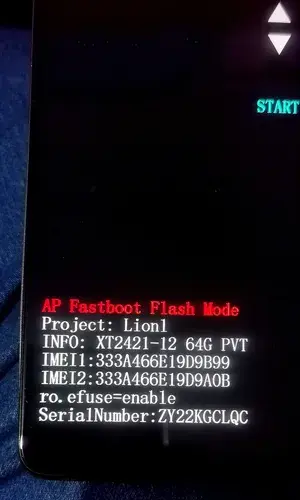
3️⃣ Send Orders + IP Click Here + SN (Whatsapp Support Click Here
4️⃣ ENTER THE DDNS THAT PROVIDES WHATSAPP SUPPORT Click Here
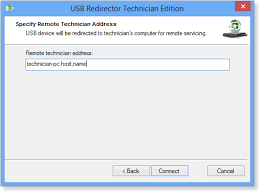
❇️When WhatsApp support provides the DDNS, enter it and click Connect.
Previously set to Metamode. In the case of MTK:
IF SPD, CONNECT IN ADB AND WAIT FOR CONNECTION ACCEPTANCE❇️
Step 1️⃣
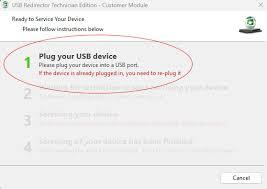
Reconnect cable for Step 2️⃣
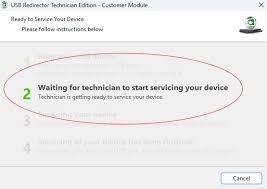
❇️Once you provide your IP address, support will proceed with your service. Please pay attention in step 3 if your device is SPD to accept ADB.❇️
Step 3️⃣
❇️Please wait for the technician to finish their service; do not disconnect in step 3.
Your equipment is at risk.❇️
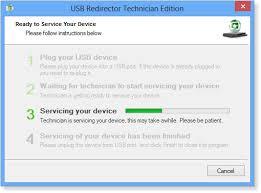
Step 4️⃣
❇️Once you reach step 4, close the program; your computer will now be processed correctly✅.
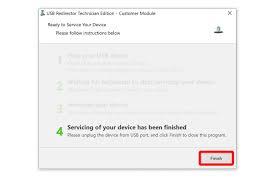
Thank you for trusting our team. ⭐DCUNLOCK TEC ARG UNITED⭐